Scormbee

PDF to SCORM converter

Turn a PDF into a SCORM course people actually work through.

Upload a policy, a manual or a training handout. Scormbee reads it, proposes an outline you approve, then writes real slides with knowledge checks and a final quiz. You edit the result like any other course and export SCORM 1.2, SCORM 2004 or a website.

The editor opens straight away. Exporting, AI and saving to the cloud need a free account.

The wizard and the price

You see what a document will cost before anything runs.

The AI wizard takes your PDF, a short brief and a few choices. The price in credits is shown on the button before you start, and it depends on two things only: how long the course is and how many pages the sources have.

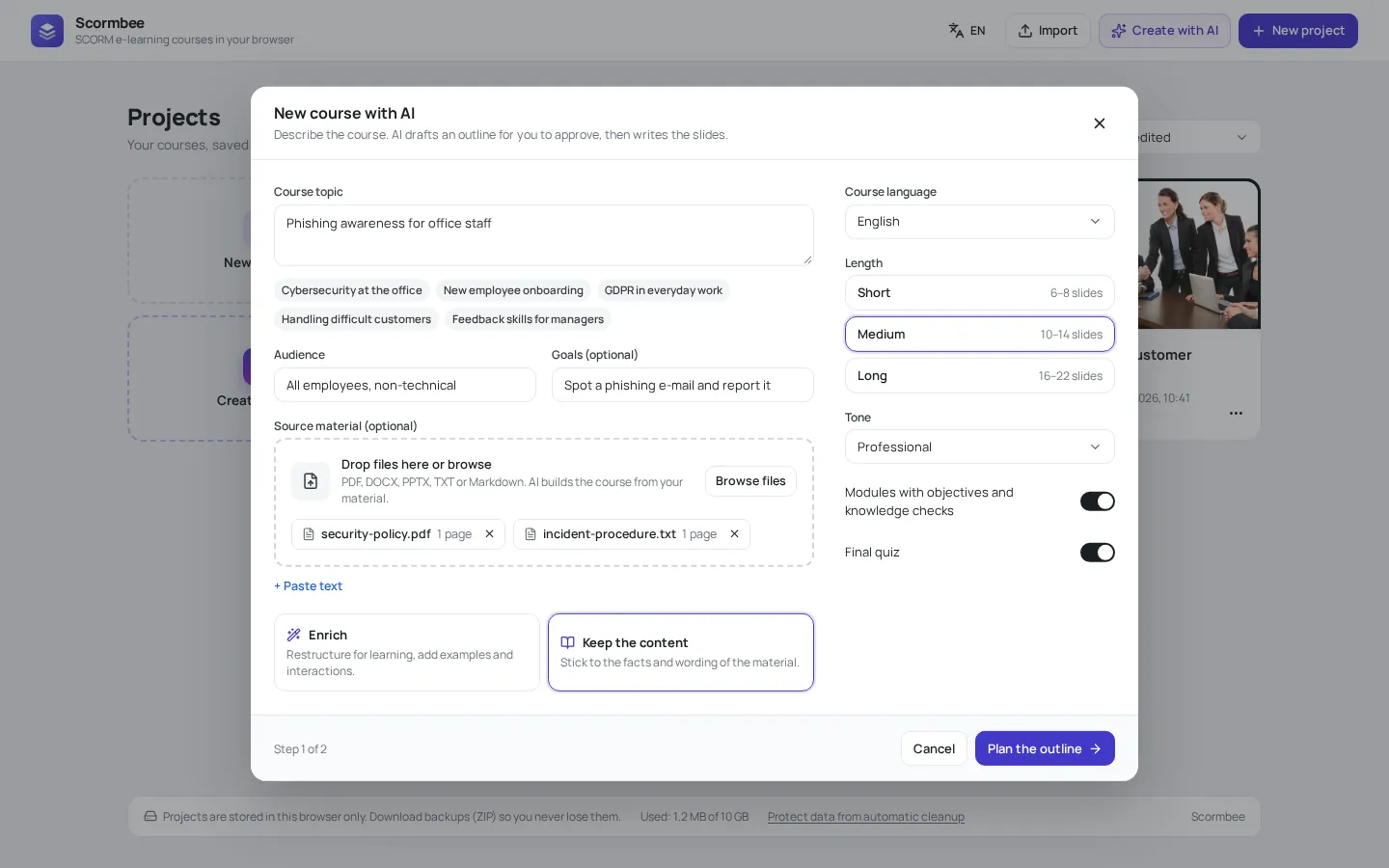
The Scormbee AI wizard with a topic, audience, goals, two source files, a length choice and the Keep the content mode selected.
The brief: topic, audience, goals, your files, length, tone and whether to add a final quiz. "Keep the content" sticks to the wording of the document.

Credits for a medium course (outline + 3 parts)

PDF pages Outline Each part Whole course
10 2 3 11 credits
30 3 4 15 credits
50 4 5 19 credits
100 7 8 31 credits

10 pages are included in every step. Above that, every started 20 pages add 1 credit to the outline and to each part, because the document goes with each of them. Text files count 3,000 characters as a page.

How it works

From PDF to SCORM package in three steps

  1. Upload the PDF and write the brief

    Add the file, then say who the course is for and what they should be able to do afterwards. Pick a length (6–8, 10–14 or 16–22 slides), a tone, the course language and whether you want a final quiz.

  2. Approve the outline

    The wizard proposes chapters and slide titles first. Rename, reorder or delete anything before a single slide is written, so you never pay for a course built on the wrong plan.

  3. Edit and export

    Slides arrive with text, interactions and quiz questions in your course look. Change anything in the editor, preview on desktop, tablet and phone, then export SCORM 1.2, SCORM 2004 or a website ZIP.

What the PDF becomes

Slides with things to do, not page images in a frame.

A PDF is written to be read. A course has to be worked through. The wizard rebuilds the content in the blocks of Scormbee, so learners answer, sort and decide instead of scrolling.

Chapters from your structure

Sections of the document become chapters, long passages become shorter slides with headings, lists, callouts and key numbers.

Knowledge checks along the way

Quiz questions, true or false, matching, ordering and sorting are written from the content itself, with the correct answers taken from your document.

A final quiz with a pass mark

Switch the final quiz on and the course reports a score and passed or failed to the LMS, next to completion.

Two ways to treat your text

"Keep the content" stays close to the facts and wording, which suits procedures and regulations. "Enrich" restructures the material for learning and adds examples and interactions.

Every answer in the LMS

Each checked answer is sent as a SCORM interaction with the learner's response, the correct one and the result.

Your look, your fonts

The course uses your colours, logo and fonts. Images from the PDF are not copied; add your own, or connect a free Pixabay key and the wizard picks stock photos.

Choose the right approach

Do you need a converted course or just the PDF in your LMS?

Search for "PDF to SCORM" and you will find two very different things. The first wraps the PDF, unchanged, in a SCORM package: the LMS shows the document and marks it complete when it opens or after a few seconds. That is quick and keeps your layout, but the LMS learns nothing except that the file was opened.

The second rebuilds the document as a course. That is what Scormbee does. It takes longer than wrapping, because you review an outline and the slides, but learners have to engage with the material, and your report shows who answered which question and how they scored.

Use a wrapper, or simply upload the PDF if your LMS accepts files, for reference material people look things up in: a price list, a long technical specification, a form. Rebuild it as a course when someone has to understand, remember or prove they know the content: onboarding, compliance, safety, product training.

A tip that saves credits

Delete the cover, table of contents, index and legal boilerplate before you upload. They are pages too, and they add nothing to the course.
Before you upload

How to get a better course from your PDF

Text PDFs work best

The AI reads the whole PDF, text and page images, so scanned pages are read too. With scans, check names, numbers and dates carefully.

Split very long manuals

One PDF can have up to 100 pages. A 300-page manual makes a better series of short courses than one long one, and each part stays cheap.

Write real goals

"Report a phishing email within five minutes" gives better questions than "know about phishing". The quiz is written to the goals you give.

Add a second source

Combine the PDF with a DOCX of internal notes or a short text you paste in. All sources together can be up to 25 MB.

Questions

Frequently asked questions

Can I convert a PDF to SCORM for free?

Yes. A free account gets 25 AI credits once, which covers about two medium courses from short PDFs. The editor and every export format are included in the free plan; free exports show a small "Made with Scormbee" badge in the player.

Will the course keep the layout of my PDF?

No. The content is rebuilt as slides in your course look, which is what makes it readable on a phone and interactive. If the exact page layout matters, a PDF wrapper or a direct upload to your LMS is the better choice.

How long can the PDF be?

Up to 100 pages and 10 MB per PDF, and up to 25 MB for all source files together. Ten pages are included in the price of each step; above that, every started 20 pages add 1 credit to the outline and to each part of the course.

Do you keep my document or train AI on it?

Tasks run on OpenAI models through our server. We do not keep your prompts or source files after a task, and OpenAI does not train its models on your content.

Which SCORM version should I export?

SCORM 1.2 is the safe default and works in practically every LMS. Choose SCORM 2004 4th edition when your LMS reports completion and pass or fail separately and you want both. You can export both from the same course.

Can I change the course after it is generated?

Everything is editable: text, layouts, interactions, quiz questions and correct answers. You can also ask the AI for one new slide (2 credits) or rewrite a paragraph (1 credit) instead of generating the whole course again.

From the blog

Further reading

Bring a PDF. Leave with a SCORM course.

Open the editor without an account and look around. Create a free account when you are ready to run the wizard and export.